Metadata to describe research data
Overview
As you collect and work with your research data, you will soon find that the observations and measured values themselves are not the only things that matter. A large amount of contextual information about the data and your research process accumulates and needs to be preserved. For example, if you are collecting air temperature data, are you measuring in degrees Celsius, Fahrenheit or Kelvin? And how far above ground are you taking the measurements? These pieces of contextual information are called metadata. Metadata are data that describe other data, and, although they may appear secondary in importance to the observations you are collecting in the field or lab, they are absolutely vital to understanding and re-using data after they are collected.

What is metadata?
Metadata should include a wide range of information about your research data, at sufficient detail for another person to understand and use the data. As a general rule, good metadata have reasonably complete details about
- Who collected the data
- What was observed or measured
- When the data were collected
- Where the data were collected
- How the data were collected (methods, instruments, etc.)
- Sometimes, stating why the data were collected or published can help future users understand data context and evaluate fitness for use.
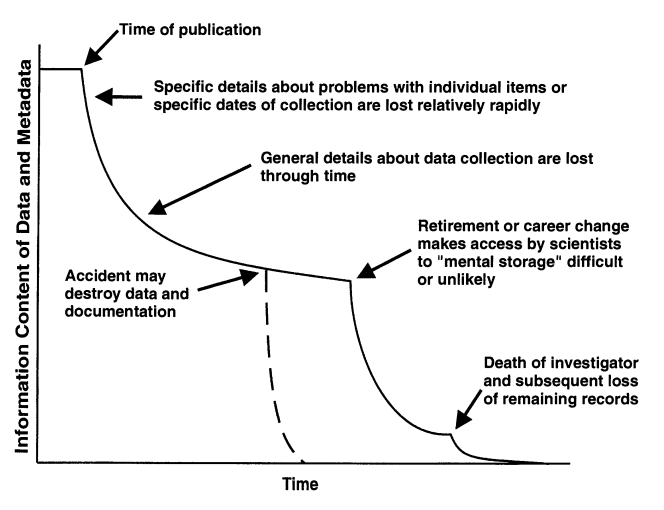
Preserving these metadata alongside your actual data (measurements, observations, etc.) makes them useful to both you and your colleagues, and prevents the loss of information about data over time, as illustrated in Figure 2. Metadata are also essential to the reproducibility of research results, and you will very likely be asked to provide adequate metadata with your data when it comes time to submit journal articles and other research products. Your reviewers, collaborators, and future self will thank you for any attention you give to metadata.
Getting started
Given their importance, creating and managing metadata should be an integral part of most research activities, including in the field, the lab, or when working with data. But, if you are a new researcher, it can be a challenge to know how to start with metadata. In the last chapter we touched on some important attributes that describe the data you collect, including intended use, content, source, and formatting. These are the just the beginning of the metadata you’ll collect, and more information will become important over time. Below are a few suggestions on how to start.
- Early in your research, start thinking about the metadata you will need.
- Look ahead to how you will analyze and interpret the data for your research project. What will you need to know to do this?
- What data do you plan to share with collaborators, reviewers, and the general public? What information will they need to understand and use the data?
- Planning ahead gives you a target for collecting appropriate metadata for your research and publications.
- Keep a detailed project log and populate it with useful metadata
- This could be a field or lab notebook, an electronic notebook or knowledge management system, or anything else you regularly make notes in as you do research. In this log, you should keep notes about:
- how new data are collected and what they are about,
- for ancillary data (not directly collected by you), documentation of the original data source,
- how the data are cleaned, quality assured, and prepared for analysis,
- data analysis steps and methods used to create figures, statistics, and derived data products,
- who is doing what.
- Whatever your project log is, record information daily, and keep it secure and backed up.
- This could be a field or lab notebook, an electronic notebook or knowledge management system, or anything else you regularly make notes in as you do research. In this log, you should keep notes about:
- Start creating structured metadata files and keep them with your data.
- Following a standard metadata format, such as one of the Jornada templates, helps you be systematic and complete about collecting metadata. You can even use community-standard, machine-readable metadata files, such as EML, for your metadata. Purpose-built applications, such as ezEML from the EDI repository, make this easy.
- Organize your research files, including data, metadata, code and documentation, into clearly-labeled project directories that keep related things together and are easy to understand and back up.
When the time comes to share your research results and data, the Publish a dataset chapter will help you get a sense of how to assemble your dataset (data and metadata) and prepare for publication at a repository. As always, discussing your project with a data manager or data curator and asking for advice about any of these activities is a smart move. At the Jornada, the Information Management team is happy to help (jornada.data@nmsu.edu), or you can reach out to the curators at our partner repository, the Environmental Data Initiative (EDI, info@edirepository.org).1
- Remember that metadata are essential for understanding and using research data after it is collected.
- Make notes (metadata) as you do research, and keep research files (data, metadata, etc.) well-organized and documented.
- Plan ahead for the datasets (data and metadata) you will use and publish, and start assembling metadata early.
- Ask your friendly neighborhood data manager for help anytime.
Recommendations for Jornada metadata
We can simplify metadata content to who, what, when, where, how, and why, but obviously metadata must contain many important concepts and details, and there are many possible ways to express these. Following some standards for metadata content and formatting helps to narrow the possibilities so that creating metadata is less overwhelming, and it helps with discovery and interoperability when datasets use similar metadata terms and formats. Below are some recommendations on how to populate metadata fields for publishable datasets. These recommendations are a user-friendly version of the detailed standards that the Jornada IM team uses to prepare datasets for publication.
Title
Any published dataset must have a title. Dataset titles should include brief, descriptive indicators of the data content, the location of data collection (if pertinent), and the temporal range of the data (what, where, and when). Keep in mind that titles are searchable in most repositories and are usually the first metadata users encounter when searching for datasets.
Some examples:
- Annual mean estimates of aboveground net primary production (NPP) at 15 sites at Jornada Basin LTER, 1989-2023
- Meteorology and soil moisture data collected at multiple frequencies from the G-SUMM NPP site automated monitoring stations: Jornada Basin LTER, 2013 - ongoing
Abstract
The abstract of a dataset is a concise, non-technical description of what data are provided, where they come from, and when and how they were collected. It can also be useful to say something about why the dataset was created (to support a journal article, long-term monitoring, etc.), but this is not always required. Dataset abstracts are similar in scope and scale to a journal article abstract, but they focus on the data themselves, and not on the research results that come from the data.
Abstracts are also searchable fields at most repositories.
Personnel and organizations
Every dataset should have metadata crediting the people and organizations that contributed to collecting the data and preparing it for publication, and should provide contact information for someone that can answer questions or provide support for the data. Most metadata standards require at least one author and one contact for any dataset.
Contacts
A contact for a dataset is a person (or position, like Data Manager) that can be contacted for information about, or access to, the dataset. Up-to-date contact information (an email address at minimum) should be provided for every dataset contact. For Jornada datasets, always include the “JRN LTER Information Manager” as a contact with this email: jornada.data@nmsu.edu. If an additional contact is desired, choose a person who will be available for the long term. This could be the lead author of the dataset, the current supervising investigator, or others; just be sure to include contact information that won’t change in the immediate future.
Keywords
A list of keywords describing the data is necessary to facilitate discovery of published datasets. Keyword lists are searchable fields in almost all publishing venues, and if chosen wisely they will allow colleagues in your research community and beyond to easily find the data you share. We strongly recommend picking at least some terms from controlled vocabularies or thesauri to add to your dataset’s keyword list. Two of these that we recommend are
- The LTER Controlled Vocabulary. This is the standard keyword list used by the LTER network and it has and extensive set of terms suitable for ecological data. We recommend picking a handful of terms, including terms from each applicable high-level category, for any dataset.
- The Jornada Keyword Thesaurus (.xlsx file). This is a locally-developed list for the Jornada. We recommend picking a Jornada placename and study name for any dataset, if you can find applicable ones.
Temporal, geographic and taxonomic coverages
The coverage metadata for a dataset communicates important information about when and where the data were collected, and, if applicable, what organisms were observed or measured. Many, but not all, metadata standards include dedicated fields for temporal coverage, geographic coverage, and taxonomic coverage. If a dedicated field does not exist in the standard you are using, then it may make sense to put this information in free-text metadata like the abstract, methods, or file descriptions.
Temporal coverage
The temporal coverage for a dataset indicates the time period over which the included data were collected. In the environmental sciences, the most common meaningful resolution is to provide a span of years over which data were collected, such as “1984 to 1989”, but including full dates and/or times can be appropriate as well. If the data were not continuously or regularly collected, then provide additional temporal information such as additional time spans, missing intervals, or describe irregular/non-annual sampling intervals (every other year, mast years, etc.). Also keep in mind that temporal coverage can be provided for individual data files if there are multiple files included in the dataset.
Geographic coverage
The geographic coverage metadata for a dataset indicates the location of observation or sampling in the data, and the general best practice is to use geographic points, lines or polygons to describe these locations in a commonly accepted, easily understood format. The most common way to do this in metadata for a tabular dataset is to provide a list of individual sampling or observation locations, or, when there are numerous sampling locations or continuous observation areas, one or more bounding boxes enclosing the sampling areas. Usually, unprojected WGS 84 coordinates in decimal degree format (EPSG:4326) are the most widely understood and accepted coordinate format. When working with explicitly geospatial data, such as remote sensing datasets or spatial models, there are purpose-built metadata standards that should be used (ISO19115, FGDC), and geospatial file formats often have integrated metadata.
At the Jornada, the level of detail to provide in metadata can vary, and is sometimes a matter of debate. Geographic coordinates for Jornada research sites and instrumentation are usually not made public due to security concerns. For publishing a dataset we generally recommend providing one or more bounding boxes surrounding the relevant locations, but these bounding boxes should not be detailed enough to allow visitors to identify sensitive research sites or instrumentation. The Jornada IM team has already defined some useful bounding boxes and can help you with this. Each geographic coverage element should include associated text that describes the location in the bounding boxes (or points, as the case may be), and text stating that “Higher resolution spatial data for this data package can be obtained by contacting the Jornada Data Manager.”
Taxonomic coverage
The taxonomic coverage metadata for a dataset indicates what organisms the data are about, and should reference distinct taxonomic entities or groups (genera, species, families, etc.) being measured or observed. There are many taxonomic systems available for use. both authoritative and informal, including some local taxonomies (species lists) specific to the Jornada and its researchers. To make the taxonomic coverage clear to Jornada users and the wider community, we recommend doing a few things:
- As you collect data, identify and record taxa at the rank or level of detail you are confident in based on your training, and check with an expert for anything beyond that.
- In your observational data, identify taxa using species names (Genus species) or standard taxonomic codes that are unique, accepted by your community and traceable to an authoritative taxonomic source (directly or indirectly).
- In your metadata, list observed taxa in the taxonomic coverage and link them to an authoritative taxonomic source.
The taxonomic authorities we recommend are:
- The USDA Plants database, which provides an authoritative plant list for the U.S. and territories, and a unique identifier system that is convenient to use for environmental scientists and managers.
- The Integrated Taxonomic Information System (ITIS) provides authoritative taxonomy for plants, animals, fungi, and microbes around the world. All taxa in ITIS have unique identifiers, the Taxonomic Serial Number (TSN).
- The Mammal Diversity Database provides authoritative taxonomy for worldwide mammal species, and unique identifiers for those species.
In your dataset, it is appropriate to link identified taxa to one of these authorities directly by using the unique identifiers they provide (in a “taxon” column, for example), and then providing the taxonomic authority in the metadata. This isn’t always practical though, and locally-based codes are often used at the Jornada. These locally based codes are easier to remember and use in the field, and they are linked to taxonomic authorities in one of our published taxa lists. When using the local codes in your data, be sure to cite the source of the codes, which are published as shown below:
- The Jornada Plant List is a comprehensive plant checklist for the Jornada that includes the field codes that the LTER Field Crew uses to identify species. All taxa are also linked to the USDA Plants database.
- The Jornada Vertebrates List is still a work in progress.
- The Jornada Invertebrates List is also a work in progress.
You don’t need to include taxonomic coverage information if the data are strictly abiotic in nature (weather station data, for example).
Methods
This methods metadata should include a detailed description of how the data were collected or otherwise derived (field procedures, laboratory analysis, data synthesis and analysis). It should be concise but sufficient to understand and use the data files in the package. When publishing derived data, which are the product of transforming or analyzing previously published data, the methods should help users reproduce the derived values.
Many Jornada datasets have associated field or lab procedures documents, QA/QC specifications, data reduction scripts, and more. If the content of these can’t be included directly in the methods metadata, you should include them as ancillary files with the published dataset. We do not recommend linking to methods information at an external website. You may also be tempted to refer to the methods in a published journal article, but be aware that not all data users have access to all journal articles. Therefore, it is best to summarize the already-published methods in the dataset metadata.
Literature cited
It is common to cite other published works (books, journal articles, etc.) when assembling a dataset. For example, as you write your methods metadata, you might want to refer to a published laboratory procedure used to analyze samples. Referencing the source you used is the most sensible way to do this. Citing published works can also help provide context for people who will analyze and interpret the data. We recommend adding a reference list for the citations you use in your dataset metadata. Some metadata standards allow placement of a reference list in a designated field of the metadata, but if this is not available, add the reference list to a free-text section of the metadata like the methods section. Use a generally-accepted reference format, such as APA or MLA, and include a DOI for each publication if available.
Data objects and their attributes
The main purpose of research datasets and their accompanying metadata are to describe and share data objects. A data object is anything attached or referred to in a dataset that contains, or can be used as, research data. Most of the time these are digital files (an Excel spreadsheet, for example), but physical samples, museum specimens, software/code, dynamic data content (a sensor stream), database entries, and offline data stores can also be valid data objects. There may be multiple data objects in a dataset, and each needs extensive metadata to describe its type, format, content, accessibility, and other attributes. Below are some metadata recommendations for data objects that are digital files, but if you have other objects in your dataset reach out to a Jornada data manager for advice.
Different repositories and metadata standards have different terms for the data objects in a dataset. You may hear the terms “file”, “data entity”, “artifact”, “asset” and more.
Description
Give each file in your dataset a brief but detailed description. You may want to include information about data type (tabular, image, geospatial, etc) and content (variables and observational units). This is especially important when there are multiple files in the dataset.
File attributes
Those who use the data files you share (including your future self) will need some cues on how to do that, so your metadata should describe each file as clearly as possible. In the previous chapter there are some file format recommendations that we won’t repeat here except to say that using file formats that are as open (non-proprietary) and understandable as possible, and describing them clearly and thoroughly, will benefit everyone involved.
- A file name is the name of the digital file as it is referred to on a computer system or storage media. Its best to use concise but descriptive file names without any special characters or spaces. Examples: plant_data_table.csv, 2007-images.zip
- The file type refers to a general file category that indicates something about the data content and how to access it. Examples: text, binary, raster image
- Provide a file format name to refer to specific file formats, usually taken from a list of known or accepted formats. At the Jornada we generally use IANA media types, but file extension, MIME types, or common names are also fine. Examples: plain text (
text/plain), comma separated values (text/csv), JPEG image (image/jpeg), PDF (application/pdf) - Access and distribution metadata defines who or what has permission to access a data file, and provides users with a means to obtain the file (a URL to download from, a network path, or request instructions). We strongly recommend publishing data to repositories and following their guidance for access and distribution instead of managing this yourself. Access levels (or permissions) can be set at the repository level, and distribution occurs via a download URL from the repository. If other arrangements need to be made for publishing data, consult with a Jornada data manager.
- Other file attributes: can sometimes be useful to include in metadata.
- A checksum is a hash value (alphanumeric string) that is uniquely generated from a digital object using a cryptographic algorithm (MD5, SHA-256). These can be used to verify the integrity of shared data files.
- Providing a file size in the metadata can be helpful to end users who want to know what they are downloading.
- A range of additional identifiers and annotations may be available depending on the metadata standard or repository being used.
Data attributes
The data in the files you share don’t speak for themselves, so metadata must explain them well enough that others can understand and use each data file. The previous chapter describes the important aspects of data content, and provides data formatting recommendations to consider. Below we describe how to communicate about the content, formatting, and meaning of data files with metadata attributes that should be provided for each variable in a data file. In tabular data files, the individual variables are usually represented as columns, but other arrangements, such as bands/layers in raster images, are not uncommon.
- Every variable needs a variable name to uniquely and clearly identify it in the metadata and data file. In tabular data this can be as simple as assigning a unique, descriptive column header to every column in the file and using that in the metadata. It is best to avoid special characters, dashes and spaces in variable names.
- Give every variable a description. This can be somewhat lengthy, and we recommend summarizing the quantity, data type, unit of measurement, and observational unit in the description. For example “Air temperature measured in degrees Celsius at 2 meters height” or “A categorical column indicating the sex of the individual (M/F)”
- Each variable has a data type that must be specified. Indicating one of the broad categories that include numeric, categorical, datetime and plain text is usually sufficient. It can be difficult to describe unstructured data, but adding detail to the variable description (above) can help, and some metadata standards allow for very specific data attributes (below).
- Depending on the data type, measurement units, categorical codes, and datetime formats must be described.
- Numeric variables should almost always have units, or at least a defined scale, described in the metadata. For quantities like mass (kg), temperature (°C), and time (s) we recommend describing measurement units in a clear, unambiguous format. If you are following a metadata standard, a units list may already be provided. You can also try a standard unit vocabulary on your own (stmml and QUDT are two options), but be sure to link to the standard if you use one. Some variables are dimensionless, and should be described as such, but even they usually have pseudo-units, such as a ratio (C:N), pH, number (count), or percentage, that needs to be documented with the data.
- For categorical variables, describe every acceptable code or level used in the data along with its meaning. Examples: (LRL=Little Rock Lake, TL=Trout Lake, ML- Muddy Lake, …), (M=male, F=female, J=juvenile)
- Use a datetime format to describe how datetime values are written as character strings in the data. The resolution and choice of formatting for datetimes varies, and some formats are ambiguous if they are not explicitly described (for example, is 07/02/1974 a July or February date?). We recommend using an ISO standard with hyphen and colon separated date and time fields in decreasing size order (year, month, day, hour, minute, second). A format string for this can be written as
YYYY-MM-DD hh:mm:ss(sub-seconds and timezone can also be included).
- If a numeric value or text code for missing values is used in the variable, it must be specified and described. There may be multiple reasons for missing values (not collected, removed by QA/QC, etc.), so explain the meaning of missing values and what codes are used for what reasons. Some common missing value codes are “-9999”, “NA”, and “NaN.”
- Other data attributes: Much more detail can be provided about variables, particularly with respect to data type. Often this information is self-evident when examining the data or can be automatically detected by software tools, but sometimes it is useful to specify how integers or strings, for example, should be interpreted.
- Describe the measurement scale used for the values in each variable. These could be drawn from the Stevens typology for numeric and categorical data (interval, ratio, ordinal, nominal) or other systems. Unstructured text data, again, can be difficult to classify but sequence data applies in some cases (document text, nucleotide data).
- Variables have a storage type, which indicates how the values are encoded in a file or on disk. Examples: character, string, integer, real, complex
- Numeric variables often have precision and uncertainty values that are important.
We’re using the term “variable” here as a shorthand to refer to any structural groupings of values in a data file (such as a column in a CSV), but this isn’t exactly correct. In statistics, variable refers to a measured or observed quantity with a value domain, but data files can also contain labels, identifiers, keys, or calculated values that aren’t technically variables.
Data provenance
If your dataset includes data from an external source, either verbatim or in derived form, you should cite the data source and describe how the source data were used and modified (if applicable). This credits the original source’s creators and improves the reproducibility of your dataset and research results. Metadata about data sources or the lineage of data is called data provenance, and it is similar to providing a reference for articles or books cited in the dataset. Some metadata standards have a dedicated field for data provenance, but if this is not the case you should add references to source datasets in the text of the methods section. When new values are derived from the cited source data, be sure to describe how they were derived.
Funding
If your research, including collection of the data you work with, is supported directly or indirectly by public or private funding, then it is usually important to credit the funding source and identify any individual awards in your metadata. Major government funding sources like the National Science Foundation require this for all journal articles, datasets, and other research products, and most academic publishing venues ask authors to acknowledge funding sources. Most metadata standards and repositories have a field for funding acknowledgement so keep track of the grants funding and include them when you publish datasets or other products. The current NSF grant funding the Jornada LTER program is award DEB 2425143.
Licensing
Publishing a dataset means making data available to the community for use, but it is a good idea to specify what community, and how they should the data. Use metadata to attach a license to your the data and communicate any intellectual rights you and other authors maintain over the publication. In general, publicly-funded research datasets should be released with the fewest restrictions on use possible, and journal reviewers and funding agencies may check this when datasets are cited in papers or proposals.
We recommend choosing a license generally agreed-upon by your research community, and using the identifier and URL from the SPDX list in the metadata. Creative Commons (https://creativecommons.org) offers a number of well-established licenses that are commonly used and appropriate for research datasets, and these can be readily found in the SPDX list. The most common recommendations for LTER Network data are CC0-1.0, which is simply a dedication to the public domain, and CC-BY-4.0, which requires attribution of the published work. At the Jornada we generally recommend CC-BY licenses.
You may also want to include an intellectual rights free text field to clearly describe the policies and expectations for use of the dataset, particularly those not already stated in the dataset license. These policies and expectations should match those agreed upon by the dataset authors and affiliated institutions, funding agencies, and/or research networks. If actual access to a dataset deviates from any policy articulated here (e.g. restricted-access packages), explain why and provide a timeframe for data release.
Metadata standards
As you can see in the section above, there are many important metadata fields with recommendations or standards applicable to each. The question now is, what kind of container or document can you keep this information in and make it understandable and useful? We recommend using standardized, community-supported metadata formats for this, and ideally they should be human- and machine-readable. Luckily, there are quite a few metadata formats that fit the bill for environmental datasets. At the Jornada we recommend using a standard metadata format called Ecological Metadata Language (EML) to describe most data, but other metadata formats may be of interest. Choosing one comes down to things like level of detail, applicability to your scientific or data domain, ease of use, and community expectations. Below are a few standards commonly used for the environmental sciences and research publishing. Sometimes the metadata standards below are related or used together, so its a good idea to know a little about more than one.
The Ecological Metadata Language (EML) was developed by the ecological and environmental sciences community (Jones et al. 2019) and is the metadata format required by our closest repository partner, the Environmental Data Initiative (EDI). The EML standard is a dialect of XML, which is a markup language designed to be both human- and machine-readable. EML is implemented with a very detailed schema (a set of rules for metadata) that allows one to create metadata documents that are flexible, modular and extensible, making them useful in many environmental data management and publishing applications.
Resources:
- The EML standard documentation, currently at version 2.2, and the schema browser.
- The LTER Network and EDI repository collaboratively maintain the Dataset Preparation Guides, which has the “Best Practices for Dataset Metadata in Ecological Metadata Language” document with extensive documentation for using EML to describe environmental datasets.
- The ezEML metadata editor, created at the EDI repository, is the Jornada’s preferred method for preparing EML documents. More on this in the next chapter.
- The EML R package is quite useful for building EML documents with R.

Dublin Core (DC) is one of the oldest and most widely adopted metadata standards, originally developed in 1995 by the Dublin Core Metadata Initiative (DCMI) for describing web resources simply and generically. The standard is domain-agnostic (not specific to scientific data) and consists of fifteen broad metadata elements (e.g., title, creator, date, subject) that can be used as-is or extended/qualified for specific applications. Dublin Core is often used as a baseline vocabulary that more specialized standards — including Darwin Core — build upon. It is formally standardized as ISO 15836.
Resources:

ISO 19115 is the international standard for describing geospatial data and services, maintained by Technical Committee 211 of the International Standards Organization. It describes a dataset’s spatial and temporal extent, coordinate reference system, data quality, and provenance (or lineage). The standard is published in parts: ISO 19115-1 defines the core metadata elements, ISO 19115-2 extends this for imagery and gridded (raster) data, and ISO 19115-3 specifies the XML implementation (and is the successor to the ISO 19139 standard). Given its size and complexity, most organizations implement a national or thematic profile instead of the full standard — examples include the North American Profile (US/Canada) and Europe’s INSPIRE metadata regulation. The most recent ISO 19115 Standard is here, but ISO standards are not freely available. You can find more useful information at open standards organizations, government agencies, or geospatial data applications that interpret and implement the ISO 19115 standards.
Resources
- The Open Geospatial Consortium develops and maintains a long list of geospatial data standards, many of which are mapped to the ISO 19115 or related standards.
- Many governments develop and promote geospatial data and metadata standards that are referenced to ISO 19115. The Federal Geographic Data Committee (FGDC) does this for the U.S., and the EU INSPIRE program for Europe.
- Major geospatial data applications have metadata editing and exchange capabilities that are referenced to ISO standards. This includes implementations in ESRI ArcGIS and the open-source QGIS platform (metadata docs) and its plugins.

Darwin Core (DwC) is a data model and metadata standard for sharing biodiversity data, maintained by Biodiversity Information Standards (TDWG). Built as an extension of Dublin Core, it defines a glossary of terms centered on taxa and their occurrence in nature, as documented by observations, specimens, and samples. DwC underlies the vast majority of species-occurrence records shared through the Global Biodiversity Information Facility (GBIF), typically packaged as a Darwin Core Archive (DwC-A). It pairs naturally with EML: EML describes the dataset as a whole, while DwC describes the individual occurrence records within it. There is now a more extensive standard, the DwC Data Package, that is suitable for packaging a greater variety of tabular data, including sampling events, with DwC occurrence data.
Resources:
- Many resources are available on the TDWG DwC group, including a DarwinCore Quick Reference Guide.
- GBIF publishes several kinds of biodiversity data and has extensive tools and documentation for preparing DwC datasets (including DwC-A and DwC-DP)

Molecular and microbiome data, including amplicons, genomes, metagenomes, transcriptomes, and the like, are widely used and integrate many kinds of data and metadata. In addition to raw sequence data, sampling information, environmental context, laboratory extraction/amplification, sequencing method, and bioinformatics pipelines all generate important metadata to describe in derived datasets and research results. The emerging standards for this metadata, at least in environmental science contexts, seem to be MIxS templates and the NMDC Metadata Schema.
Resources:
- Here is MIxS template background information from the Genomic Standards Consortium.
- See how molecular/microbiome metadata can be useful by browsing for data at the NMDC data portal.
- The Jornada IM team doesn’t have much to recommend about how to collect this type of metadata yet, but we are working on some template ideas… stay tuned.

Schema.org is a multi-purpose, collaboratively maintained vocabulary (backed by Google, Microsoft, Yahoo, and Yandex) for embedding structured metadata directly into web pages. The Schema.org Dataset type is a lightweight set of properties — name, description, creator, distribution, license, and similar — designed to make datasets discoverable through search engines, most notably Google Dataset Search. It does not provide detailed documentation needed for scientific reuse, but is typically embedded as JSON-LD in a dataset’s landing page. Repositories often generate and embed this metadata automatically by summarizing a more comprehensive standard like EML.
Resources:
- The schema.org/Dataset specification
- The Science on Schema.org ESIP cluster provides guidance on creating and using schema.org/Dataset metadata for life sciences applications.
Croissant is a metadata format released in 2024 by MLCommons to make datasets ready for machine learning (ML) use. It is encoded as JSON-LD and extends the schema.org Dataset vocabulary with elements describing a dataset’s file resources, internal record/field structure, and default ML semantics (e.g., splits, labels), allowing datasets to be loaded directly into frameworks like PyTorch, TensorFlow, or JAX without custom preprocessing code. It’s increasingly supported by repositories and ML platforms, including Hugging Face, Kaggle, and OpenML, and by Google Dataset Search.
Resources:
Hopefully the ideas here will help you choose a metadata standard, but you don’t need to agonize over the decision. If you aren’t ready to choose a metadata standard, just start using one of the Jornada metadata templates (available here) to collect, organize and store complete metadata. When you are ready, Jornada data managers can help you choose a standard and prepare a metadata document.
References
Footnotes
If you are at different LTER site, this list of Information Managers may help. Outside of LTER, your academic institution’s library may have data curators, or you can check the Data Curation Network, a professional membership organization for data curators. Most other data repositories also have curation staff that can help you.↩︎